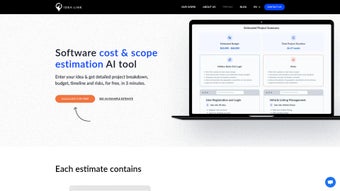

Download AI Software Cost Estimator – free AI‑driven project budgeting tool
Introduction
Accurately estimating the cost of a software development project has always been one of the most challenging aspects of technology management. Traditional spreadsheets, manual calculations, and gut‑feel guesses often lead to overruns, missed deadlines, and strained relationships with investors or clients. In today’s fast‑paced market, where a single month of delay can translate into lost revenue or competitive disadvantage, having a reliable, data‑backed budgeting tool is no longer a luxury—it’s a necessity.
AI Software Cost Estimator steps into this gap by providing a cloud‑based, AI‑powered platform that transforms raw project inputs into detailed, actionable cost forecasts. Whether you are a solo founder validating a prototype idea, a product manager aligning stakeholder expectations, or a CFO overseeing a portfolio of initiatives, this tool offers a blend of speed, precision, and transparency that can dramatically reduce the guesswork traditionally associated with software budgeting. Moreover, because the service is free for unlimited estimations, it democratizes access to sophisticated financial modeling without the overhead of expensive licences or consulting fees.
This introduction will explore why the tool matters, who can benefit most, and what sets it apart from generic calculators that simply multiply headcount by hourly rates.
Overview & Key Features
AI Software Cost Estimator is a web‑based application designed to remove uncertainty from software‑development budgeting. Powered by state‑of‑the‑art machine‑learning models trained on millions of historical project datasets, the platform accepts a wide range of parameters—platform type, technology stack, team composition, feature complexity, quality standards, and timeline—and instantly returns a comprehensive cost breakdown. The interface follows a clean, step‑by‑step wizard that guides users through data entry, visualises the results with interactive charts, and offers scenario‑building tools for side‑by‑side comparison of alternative project configurations.
Because the solution lives in the cloud, there is no need for local installation; any modern browser on Windows, macOS, Linux, Android, or iOS can access the full functionality. Security is baked in with end‑to‑end encryption, GDPR compliance, and ISO‑27001 certification, ensuring that sensitive project details remain private. The free tier provides unlimited estimations, while premium plans unlock API access, custom branding, and deeper analytics for enterprises that require integration into existing workflows.
Below is a detailed look at the most compelling features that make this estimator a standout choice for teams of any size.
- AI‑driven estimation engine: Utilises deep‑learning models trained on a global dataset of software projects to generate realistic cost forecasts that adapt to emerging technologies and market trends.
- Rich parameter input: Supports selection of platform (web, mobile, desktop), technology stack (React, .NET, Node.js, Flutter, etc.), team roles, seniority levels, feature set, and quality targets (MVP, standard, enterprise).
- Instant, visual cost breakdown: Produces pie‑charts, bar graphs, and tabular summaries that separate labor, licensing, infrastructure, and contingency costs within seconds.
- Scenario comparison builder: Allows users to save multiple configurations and view side‑by‑side cost differences, helping identify the most cost‑effective approach before any code is written.
- Exportable deliverables: Generates downloadable PDFs, CSV files, and shareable read‑only links that can be attached to proposals, investor decks, or internal roadmaps.
- Continuous learning loop: The backend continuously ingests anonymised project data, retraining the AI models weekly to stay current with salary shifts, licensing changes, and new tech stacks.
- Enterprise‑grade security: All data is encrypted in transit (TLS 1.3) and at rest (AES‑256), with strict access controls and compliance certifications (GDPR, CCPA, ISO‑27001).
- Multi‑language support: Interface available in English, Spanish, German, French, and Mandarin, making it accessible to global teams.
- Free unlimited usage: Core estimation engine and export features are completely free; premium add‑ons such as API access, custom branding, and advanced analytics are offered on a subscription basis.
- Responsive, device‑agnostic design: Optimised for desktops, tablets, and smartphones, ensuring a consistent experience whether you’re in the office or on the go.
Installation, Usage & Compatibility
Because AI Software Cost Estimator is a cloud‑native SaaS solution, there is no traditional installation process to worry about. The platform runs entirely in the browser, which means you can start estimating within minutes of creating an account. Follow these detailed steps to get the most out of the tool:
- Create a secure account: Navigate to aisoftwarecostestimator.com, click “Sign Up”, and provide a valid email address. Choose a strong password and complete the verification link sent to your inbox. For added protection, enable two‑factor authentication (2FA) via an authenticator app.
- Log in and explore the dashboard: After confirming your email, log in to the main dashboard where you’ll see a “New Estimate” button, recent projects, and quick‑access shortcuts to export and share functions.
- Initiate a new estimation wizard: Click “New Estimate” to launch a guided, multi‑step form. The wizard is intentionally linear, prompting you for high‑level project details before diving into granular parameters.
- Enter platform and technology details: Select the target platform (iOS, Android, Web, Desktop), choose the preferred tech stack (e.g., React Native, Spring Boot, .NET Core), and indicate any third‑party services or APIs you plan to integrate.
- Define feature scope and complexity: List core functionalities (user authentication, reporting, real‑time chat, etc.) and assign a complexity rating (low, medium, high). This information directly influences the AI’s effort estimation.
- Specify team composition and seniority: Input the number of developers, designers, QA engineers, and project managers, and select seniority levels (junior, mid‑level, senior). Salary bands are automatically applied based on regional data, but you can override them if needed.
- Set quality and risk parameters: Choose a quality tier (MVP, standard, enterprise) and flag any known risks such as regulatory compliance, data‑privacy concerns, or reliance on niche third‑party libraries.
- Generate the estimate: Press “Calculate”. Within a few seconds, the AI engine produces a detailed cost report, complete with visual breakdowns, risk heatmaps, and suggested optimisation strategies.
- Iterate and compare scenarios: Use the “Scenario Builder” to clone the current estimate, tweak one or more variables, and instantly see how the cost changes. This feature is invaluable for stakeholder negotiations.
- Export, share, and archive: Click “Export” to download a PDF or CSV, or generate a secure shareable link for external reviewers. All estimates are automatically saved in your “History” tab for future reference.
The platform is fully compatible with all major operating systems. Windows 10/11, macOS 11+, Linux (Ubuntu 20.04+, Fedora 34+), Android 8+, and iOS 13+ are officially supported, and the responsive design ensures a smooth experience on laptops, desktops, tablets, and smartphones alike. No additional plugins or system requirements are needed beyond a modern browser (Chrome, Edge, Firefox, Safari).
Pros, Cons & Frequently Asked Questions
Pros
- Free unlimited estimations make advanced budgeting accessible to startups, students, and small agencies.
- AI‑driven predictions reduce reliance on manual spreadsheet calculations and human bias.
- Scenario builder enables rapid “what‑if” analysis, helping teams choose the most cost‑effective architecture.
- Responsive, cloud‑only design works on any device without performance degradation.
- Robust security (TLS 1.3, AES‑256, GDPR/ISO‑27001 compliance) protects sensitive project data.
- Continuous model updates ensure estimates stay current with market salary trends and emerging technologies.
Cons
- Premium API access and custom branding are locked behind a paid plan, limiting deep integration for free users.
- Estimates are based on historical averages; niche or highly innovative tech stacks may be under‑ or over‑estimated.
- No offline mode—an active internet connection is required for every calculation.
- Regional salary customization is limited in the free tier, which can affect accuracy for teams outside major markets.
- While the UI is intuitive, very large projects with hundreds of features may require multiple estimations to capture full complexity.
Frequently Asked Questions
Is AI Software Cost Estimator truly free for unlimited use?
Yes. The core estimation engine, dashboard, and export options are completely free with no hidden usage caps. The platform generates unlimited project estimates for any registered user. Premium features—such as API integration, custom branding, and advanced analytics—are offered on a subscription basis, but they are optional and not required to benefit from the primary budgeting capabilities.
Can I use the estimator for non‑software or hardware projects?
The model is specifically trained on software‑development data, including labor, licensing, cloud infrastructure, and testing costs. While you could loosely approximate hardware‑related expenses by mapping them to custom cost categories, the predictions will not reflect the nuances of manufacturing, supply‑chain logistics, or physical component pricing. For accurate hardware budgeting, a dedicated tool would be more appropriate.
How does the AI stay current with evolving technology stacks and salary trends?
The backend continuously ingests anonymised data from millions of completed projects submitted by users worldwide. This data feed includes information on new programming languages, framework adoption rates, regional salary benchmarks, and licensing changes. The machine‑learning models are retrained on a weekly schedule, ensuring that the estimator reflects the latest market conditions and emerging tech trends.
Is my project data stored securely, and can I delete it permanently?
All data transmitted between your browser and our servers is encrypted using TLS 1.3, and data at rest is encrypted with AES‑256. The service complies with GDPR, CCPA, and ISO‑27001 standards. Users have full control over their estimates; each project can be archived or permanently deleted from the “History” tab at any time, and deleted records are removed from our active databases within 30 days.
Can the estimator be integrated into my existing project‑management workflow?
Yes. For users on a paid plan, a RESTful API is available that allows you to programmatically submit project parameters and retrieve cost estimates in JSON format. This makes it possible to embed budgeting directly into tools such as Jira, Azure DevOps, or custom dashboards. The free tier does not include API access, but you can still manually export CSV or PDF files and import them into your workflow.
Conclusion & Call‑to‑Action
AI Software Cost Estimator delivers a compelling mix of AI‑driven accuracy, ease of use, and zero‑cost access that makes it an essential addition to any software‑project planning toolkit. The platform’s ability to instantly translate high‑level requirements into a granular cost breakdown helps teams set realistic budgets, win stakeholder confidence, and avoid costly surprises down the line. While the lack of offline capability and limited regional salary customization in the free version are minor drawbacks, they are outweighed by the value of unlimited, secure estimations and the continuous learning engine that keeps the model relevant. If you’re ready to replace guesswork with data‑backed budgeting, simply sign up for a free account today and start generating precise, professional‑grade cost estimates in seconds.



.png)



